
TL;DR: Salesforce Release 260 adds native cart-to-quote RFQ submission for B2B Experience Cloud storefronts — reducing a typical 7-step manual quote process to 4 connected steps inside Salesforce. Buyers submit requests in-storefront; sales teams negotiate and return approved quotes for self-service checkout. Requires Enterprise, Unlimited, or Developer edition with Revenue Cloud Advanced or Sales Cloud Advanced enabled.
B2B procurement is moving fast. Eighty-five percent of B2B organisations now operate a self-service ecommerce storefront or buyer portal (Shopify Enterprise, 2025), yet complex purchases — those requiring custom pricing, volume discounts, or multi-product bundles — still stall in the gap between self-service and sales-assisted commerce. Buyers abandon carts to call reps. Reps build quotes in disconnected tools. Deal cycles stretch.
Release 260 (Salesforce Spring '26) directly targets this gap. The update ships a native Request for Quote capability for B2B Commerce storefronts in Experience Cloud, giving authenticated buyers a direct path to submit RFQ requests — without leaving the storefront — while routing those requests straight into Salesforce for sales review, negotiation, and return. This article covers every RFQ enhancement in Release 260, the end-to-end workflow, the configuration steps for administrators, and the B2B commerce scenarios where RFQ delivers the most value.
What Is Request for Quote in Salesforce Experience Cloud?
Request for Quote is a procurement process where a buyer requests pricing from a vendor before committing to purchase. In B2B commerce, RFQ handles the scenarios self-service pricing can't: non-standard quantities, negotiated contracts, complex product configurations, or purchases requiring internal approval before checkout. According to a 2025 PwC Digital Procurement Survey, 94% of purchasing departments now use Source-to-Pay (S2P) digital solutions — and quote management is one of the highest-priority capabilities they demand (PwC, 2025).
Before Release 260, Salesforce Experience Cloud supported quote workflows primarily through Sales Cloud CPQ or fragmented manual handoffs. A buyer would leave the storefront, contact a sales rep via email or phone, and the rep would manually build a quote in a separate tool before sending it back. This created friction at exactly the moment a buyer was ready to commit.

The Experience Cloud RFQ feature changes this by keeping the buyer inside the storefront while routing the quote request directly into Salesforce — where sales reps already work.
Practitioner perspective: The friction in traditional RFQ isn't just about the number of steps — it's about context loss. When a buyer leaves the storefront to email a rep, the cart contents, product configuration, and purchase intent are lost. Release 260 preserves that context because the RFQ is submitted directly from the live cart, giving the rep exact line items, quantities, and buyer intent data inside Salesforce from the very first moment of engagement.
What's New in Release 260: RFQ Enhancements Breakdown
Release 260 ships three interconnected RFQ capabilities that weren't available as native Experience Cloud components before this release. Together they build a complete in-storefront quote workflow — from the buyer's first request to the final accepted quote.

Request Quote from Cart
The flagship addition is the Request Quote component on the Cart page. Authenticated B2B buyers can initiate an RFQ directly from their shopping cart by clicking a "Request a Quote" button alongside the standard checkout flow. The buyer completes a configurable submission form — capturing delivery timelines, budget context, approval requirements, or any custom fields the sales team needs — and submits.
The submission lands in Salesforce as a Quote record, pre-populated with the exact cart line items, quantities, and buyer account information. Sales reps see the full context without a single email or phone call to gather it.
Request Quote from the Product Detail Page
For buyers who want to explore pricing before building a full cart, Release 260 also adds RFQ capability directly on the Product Detail Page (PDP). Authenticated buyers can submit a quote request from a single product's detail page, enabling a rep to engage with a specific product conversation before the buyer has committed to a cart configuration. This matters most for complex or configurable products where price varies significantly by specification, volume, or lead time.
Seamless Sales Handoff (Shipping June 2026)
Shipping in June 2026 as part of the Spring '26 roadmap, the Seamless Sales Handoff feature completes the round-trip. Once a rep negotiates a final price inside Salesforce, they can send the approved quote back to the buyer directly within the Experience Cloud storefront. The buyer reviews the negotiated quote and completes the transaction self-service — no manual order entry required on the rep's side.
According to Dentsu's 2025 research, 77% of all B2B buying processes now involve AI at some stage (Dentsu, 2025). When buyers submit RFQs through Experience Cloud, every interaction — product viewed, quantity entered, form field completed — is captured in Salesforce as structured data. That's exactly the context AI-assisted negotiation tools need to surface pricing recommendations and accelerate deal closure. An email thread can't provide the same signal.
How the RFQ Workflow Works End-to-End
The Release 260 RFQ workflow runs a clean three-phase loop inside the Salesforce ecosystem — no external tools, no email handoffs, no context loss between buyer and rep. How does each phase connect?

Phase 1 — Buyer Submission
An authenticated B2B buyer browses the storefront, adds products to their cart (or opens a specific product's PDP), and clicks "Request a Quote." They complete the submission form with any details the sales team needs and submit. The cart is preserved as a Quote record in Salesforce — with full line-item detail and buyer account context automatically attached.
Phase 2 — Sales Review and Negotiation
The sales rep opens the Quote record in Salesforce and sees the full picture: exact products, quantities, the buyer's account tier, any pre-negotiated pricing rules, and the form fields the buyer completed. The rep adjusts pricing or terms as needed, can run a negotiation loop if additional rounds are required, and prepares the final accepted quote.
Phase 3 — Buyer Acceptance and Checkout
When the Seamless Sales Handoff ships in June 2026, the negotiated quote returns to the buyer inside the storefront. The buyer reviews the final pricing and checks out self-service — completing the transaction without switching channels or calling back.
Practitioner note: In B2B commerce implementations, the context handoff between storefront and sales rep is where quote deals most commonly stall. When a buyer submits by email, the rep spends the first portion of every engagement re-gathering information the buyer already provided. The Release 260 cart submission model eliminates this entirely — the rep opens Salesforce and the full picture is already there.
How Administrators Can Configure RFQ in Salesforce Experience Cloud
Setting up the Request for Quote feature in Release 260 is straightforward for admins familiar with Experience Builder. Here's what you need before you start, and what to do once you're in.
Prerequisites
- Salesforce Edition: Enterprise, Unlimited, or Developer
- Commerce Licence: Revenue Cloud Advanced or Sales Cloud Advanced must be enabled on your org
- Experience Cloud Site: An active B2B Commerce storefront built on Experience Cloud
- Authenticated Buyers: RFQ submissions are only available to logged-in buyers — guest sessions see the standard checkout path only
Step-by-Step Configuration
Step 1 — Open Experience Builder
Navigate in Setup to Digital Experiences → All Sites → click Builder next to your B2B Commerce site.
Step 2 — Navigate to the Cart Page
Select the Cart page from the page navigation panel on the left side of Experience Builder.
Step 3 — Drag the Request Quote Component
From the Components panel, find the Request Quote component and drag it onto the Cart page. Position it relative to your existing checkout button — typically as a secondary call to action below it.
Step 4 — Configure the Submission Form Fields
Click the component to open its property panel. Add, remove, or reorder the fields on the quote submission form. Common fields to include:
- Requested delivery date
- Budget range or target price
- Approval required (yes/no)
- Special instructions or product customisation notes
- Preferred contact method
Step 5 — Publish and Test
Publish the update and test with a buyer user in your sandbox. Submit a quote from a populated cart and verify the Quote record appears in Salesforce with the correct line items, quantities, and buyer data attached.
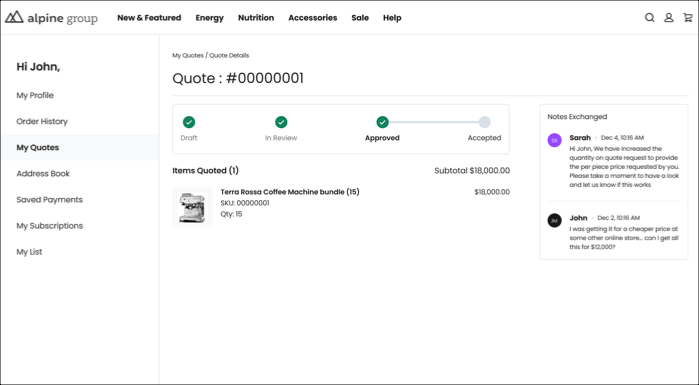
In Salesforce Release 260, authenticated B2B buyers can submit RFQ requests directly from their Experience Cloud cart or PDP, with quote details landing as a native Quote record in Salesforce — available in Enterprise, Unlimited, and Developer editions with Revenue Cloud Advanced or Sales Cloud Advanced (Salesforce Spring '26 Release Notes, 2026). This removes the manual context-gathering step that typically adds two or more touchpoints to every negotiated B2B deal.
Real-World Use Cases for B2B Commerce Teams
The Release 260 RFQ feature addresses several high-frequency B2B commerce scenarios that previously fell outside the scope of self-service storefronts. What scenarios benefit most?

Manufacturing and Complex Product SKUs
Manufacturers selling configurable products — machinery, industrial components, custom material orders — deal with quotes on nearly every transaction. The PDP-level quote request in Release 260 lets a buyer initiate a pricing conversation on a single component before building a full order. The rep receives precise product context inside Salesforce from the very first contact, not after several clarifying emails.
Procurement Teams with Budget Thresholds
Many B2B buyers require internal purchase approval above a certain dollar amount. The configurable RFQ form can include an "Approval Required" field that signals to the sales rep exactly where the deal sits in the buyer's internal process — letting reps time follow-up appropriately and avoid chasing deals still awaiting sign-off.
Distributor and Wholesale Pricing Negotiations
Distributors buying in volume often carry pre-negotiated pricing tiers that differ from list price. The cart-based RFQ submission preserves the full cart line items, letting a rep apply account-specific pricing rules in Salesforce and return a correctly discounted quote — without the buyer needing to explain their contract terms in a separate email.
Configuration tip: For organisations with multiple buyer account tiers (Platinum, Gold, Standard), consider using Salesforce Flow to automatically route submitted RFQs to the appropriate rep queue based on the buyer's account tier. This removes manual queue management and ensures high-value accounts receive priority response times — a configuration pattern that works cleanly alongside Release 260's native RFQ component without any custom development.
According to a 2025 Forrester study, 89% of B2B buyers now use generative AI as a primary source of self-guided information throughout the buying process (Forrester, 2025). Buyers who can research, configure, and request quotes entirely inside one platform are far less likely to abandon the deal mid-cycle than those who must context-switch across email, phone, and storefront. The in-storefront RFQ flow is a direct deal retention tool — not just an efficiency improvement for the sales team.
Frequently Asked Questions
Common questions from Salesforce admins and B2B commerce managers about the Release 260 RFQ feature.
Conclusion
Release 260 moves Salesforce Experience Cloud from a pure self-service commerce platform to a connected hybrid model — one where complex, negotiated B2B deals stay inside a single ecosystem from first quote request to final checkout. The key takeaways for administrators and B2B commerce teams:
- Request Quote from Cart is available now — drag the component into Experience Builder, configure your form fields with the sales team, and buyers can submit RFQs without leaving the storefront
- Request Quote from PDP enables single-product quote conversations before a buyer commits to a full cart build
- Seamless Sales Handoff (June 2026) closes the loop — negotiated quotes return to buyers for self-service checkout, eliminating the manual order-entry step
- Prerequisites are straightforward: Enterprise, Unlimited, or Developer edition plus Revenue Cloud Advanced or Sales Cloud Advanced
For administrators, the immediate action is to enable the component in your sandbox, align on form fields with your sales team, run an end-to-end test, and publish to production. The B2B commerce teams that adopt in-storefront RFQ early will remove the most common source of deal-cycle friction before their competitors do.
Related Resources
Need help configuring RFQ in your Salesforce org?
SmartHub Tech is a Salesforce Certified partner specialising in B2B Commerce and Experience Cloud implementations. Book a free consultation to discuss your RFQ workflow setup.
Book a Strategy Call